
Manage Publishers
The Publishers Lists table allows you to easily manage and organize all your uploaded publisher lists.
You’ll find this section under Resources > Publishers lists, and from here, you can view, filter, and search through your lists with ease.
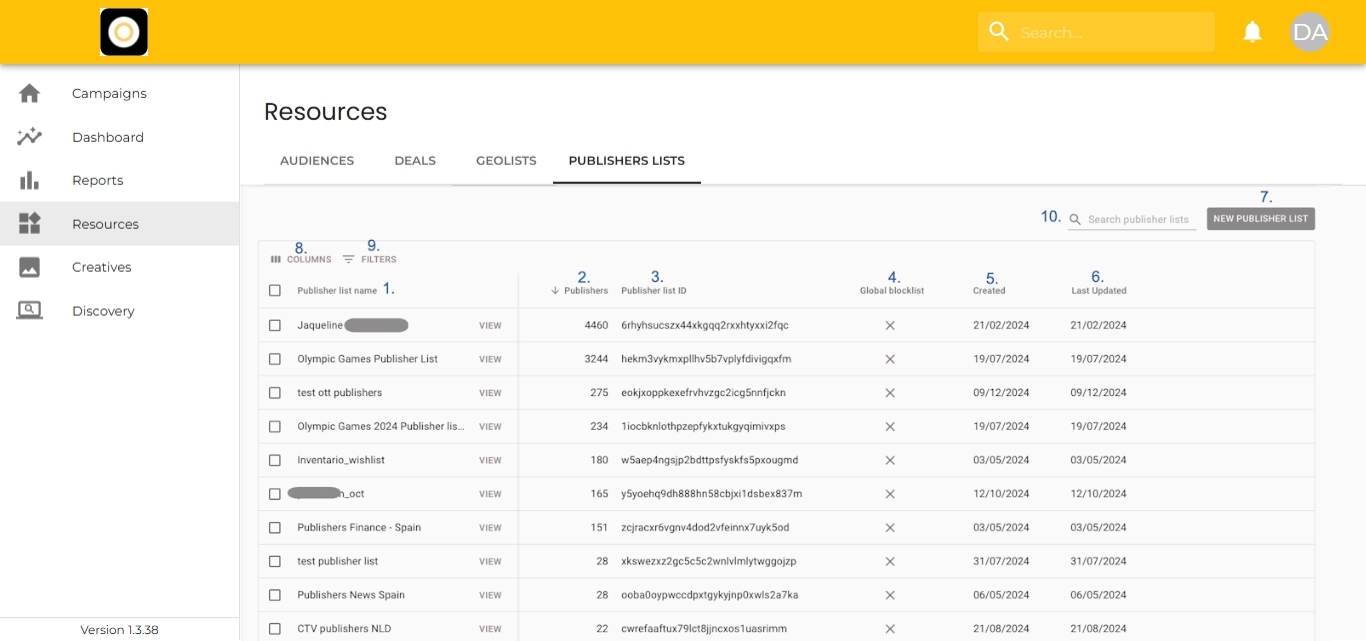
What You’ll See in the Table
Each row in the table provides a quick overview, including:
-
Publishers List Name – So you know which list you’re looking at
-
Number of Publishers – How many identifiers are in the list
-
Publishers List ID – A unique alphanumerical ID assigned by the platform
-
Global Blocklist Status – Whether the list is part of your organization’s global blocklist
-
Created Date – When the list was first added
-
Last Updated Date – When the list was last modified
Customize Your View
You can tailor the table to suit your workflow:
-
Choose Displayed Columns – Click ‘Columns’ and toggle the fields you want to show/hide
-
Filter Results – Use filters to narrow down by:
-
List Name
-
Number of Publishers
-
Publisher List ID
-
-
Search Quickly – Use the search bar (top right) if scrolling isn’t cutting it